Hawker Airport (Avgas)
Hawker Avgas Instructions
App setup
The following instructions can be found inside the payment terminal on the tarmac approx. 10m from fuel tank.
- Scan QR code & download Compac Pay App OR search “Compac Pay” in App Store/Google Play and download
- Open Compac Pay App and select “SIGN UP”
- Enter email address and create a password
- A verification code will be sent to your email
- Enter verification code into app
- Select “ADD COMPANY” and enter organisation code “ALN498”
- Select card icon at bottom of screen, then select “ADD CARD”
- Enter details of card with which you wish to pay
- Select “SUBMIT”
- Select home icon at bottom of screen, then follow the prompts to add fuel
Points to note around payment terminal:
- Only press emergency stop button in case of emergency. Emergency stop cannot be reset without a Council call out. Do not attempt to reset yourself.
- There is a card terminal in payment terminal, but it is unreliable, highly recommend using Compac Pay App.
Taking Fuel
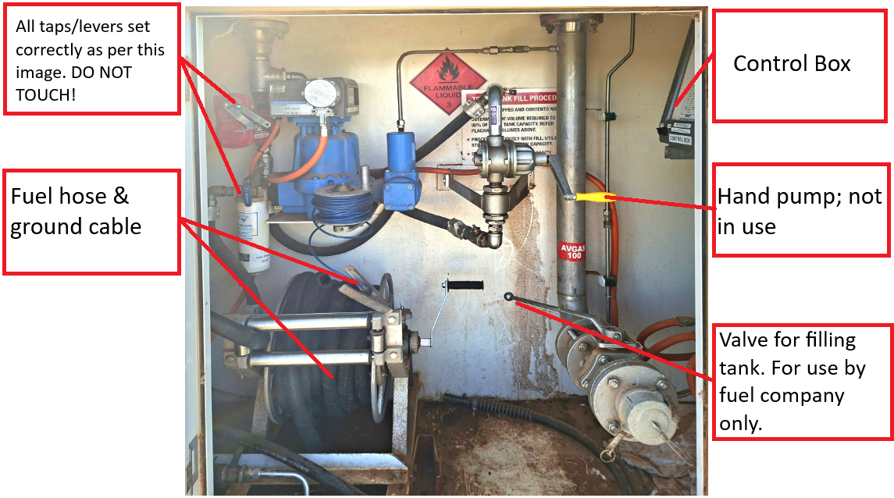
- Set fuel hose in aircraft and apply grounding cable
- Make sure control box (at RHS of cabinet) is switched “OFF”
- Authorise dollar amount at payment terminal/in app
- Authorise litre amount in control box
- Turn switch on control box to “ON”, should now hear pump
- Pump fuel
- Turn switch “OFF” at control box
NOTE: Fuel may not pump right away, may take several minutes to prime pump: DO NOT ADJUST ANY VALVES OR SWITCHES. If there is no pump sound check process was followed correctly, if all correct emergency stop may have been pressed and will have to send someone out.